
Lighthouse Weather for iPhone, iPad, Mac & Apple Watch

The whole forecast, at a glance.

Lighthouse lines up temperature, rain, wind and five more layers on one hourly chart, ten days long, with official weather alerts. Every figure comes from established forecasts, shown exactly as they are.

Coming soonto the App Store See what makes it different
  • Free to download
  • Hourly for ten days
  • Official alerts
  • No ads or tracking
What makes Lighthouse different

Not another stack of cards. One forecast, one timeline.

Most weather apps break the forecast into tiles: one for temperature, one for rain, one for wind, each with its own scale and its own hours. Lighthouse draws them together, so you can see the gust arrive with the shower and the temperature fall behind it, at a glance.

One chart

Your whole forecast in one chart.

Temperature, feels like, rain, wind, cloud cover, UV, humidity and pressure share a single hourly timeline. Turn on the layers you care about; each keeps its own lane, and all of them line up in time.

  • Temperature
  • Feels Like
  • Rain
  • Wind
  • Cloud Cover
  • UV
  • Humidity
  • Pressure
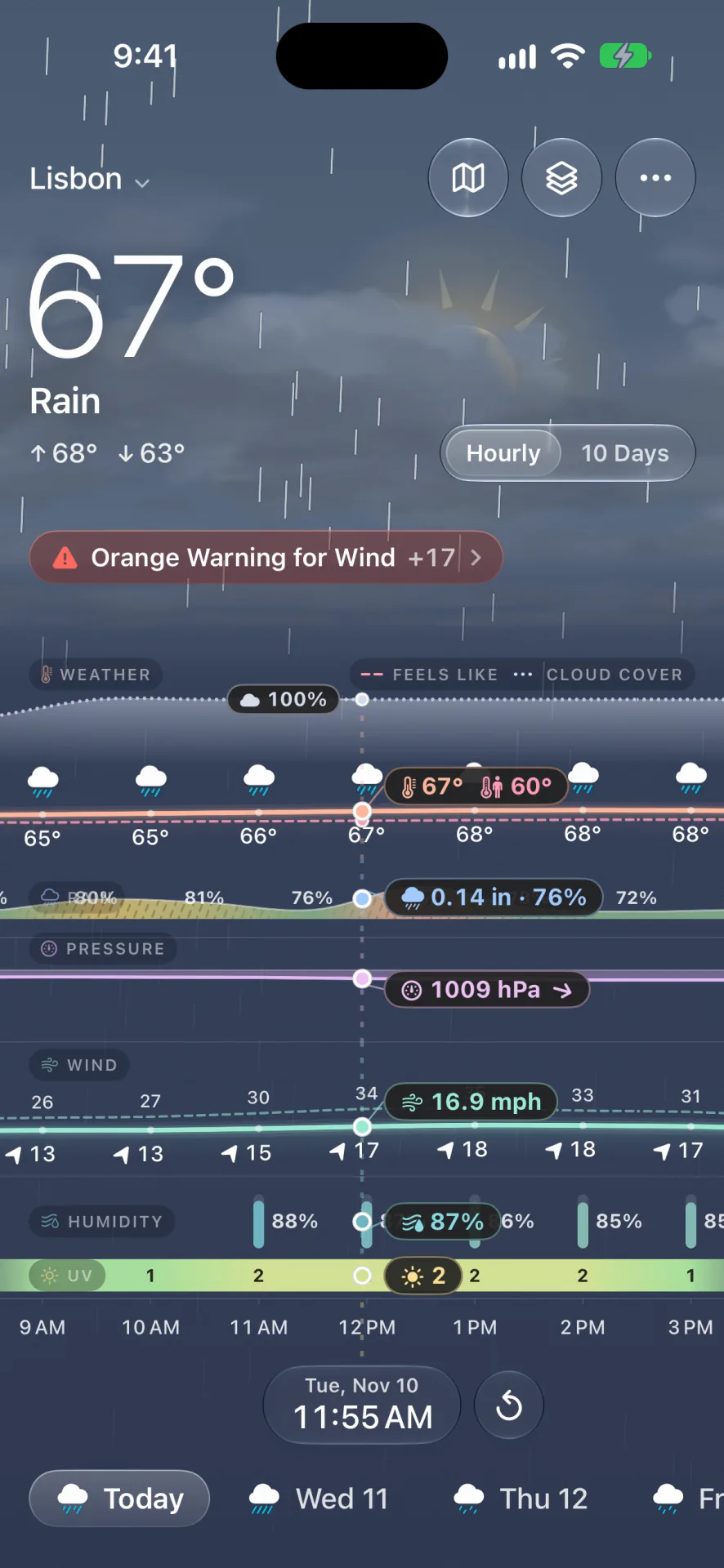
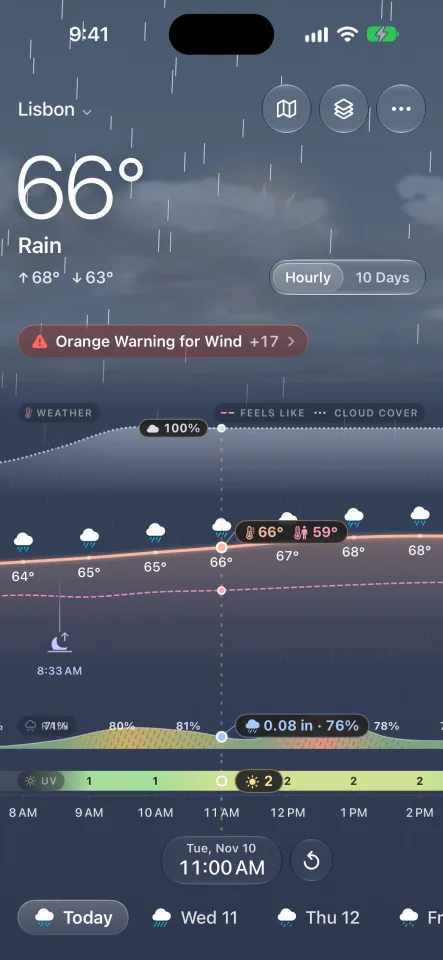
Lighthouse in Lisbon: 67 degrees and rain, an orange warning for wind, and the chart with temperature, rain, pressure, wind and humidity lanes lined up hour by hour.
Accuracy and reliability

Forecasts you can rely on.

A clear chart is only as good as the figures in it. Lighthouse shows forecasts from established weather services exactly as they are, keeps them current, and never patches one forecast with another.

  • Established forecasts

    Forecasts from established weather services, built on national and global weather models, hour by hour for all ten days. Lighthouse shows what they say; it doesn't invent a forecast of its own.

  • Official alerts, kept current

    Severe weather warnings as national agencies issue them, with the agency named. They're rechecked as often as every half hour, and any that can't be confirmed are taken down.

  • Never a patchwork

    Each layer comes whole from one forecast, and the app, its widgets and Apple Watch show the same figures for the same hour. With Lighthouse Pro, switch any layer to a second forecast to compare.

At a glance

A sky that lives with the weather.

Above the chart, an illustrated sky shows the conditions before you read a number: clouds build before the rain, snow falls, the sun goes down. The sun and the moon, in its real phase, cross it as you move through the day, and sunrise, sunset and moonrise are marked on the timeline.

Swipe from afternoon into evening and watch the light change with the forecast.

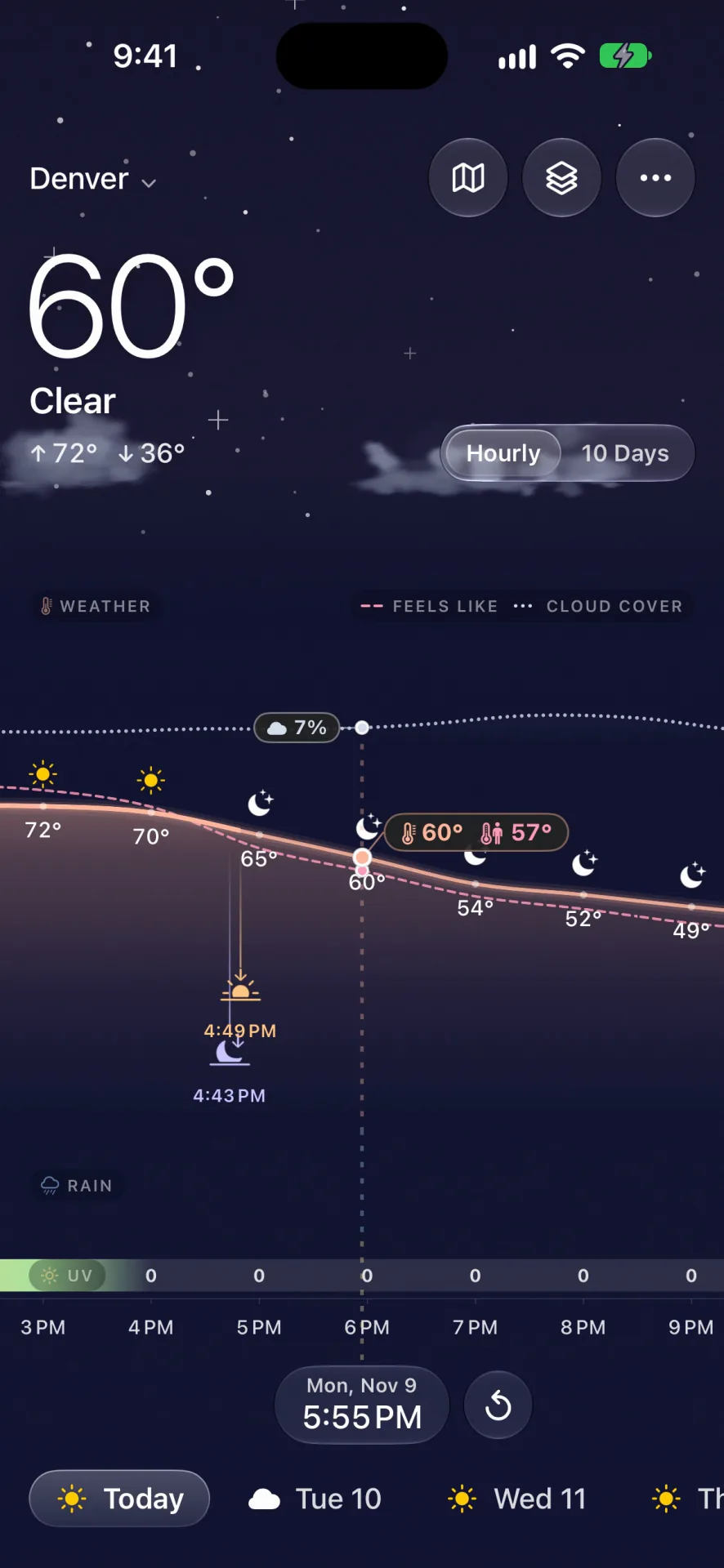
Lighthouse in Denver at 5:55 PM: 60 degrees and clear, a night sky full of stars, and sunset marked on the chart at 4:43 PM.

Rain, snow or shine, in one look.

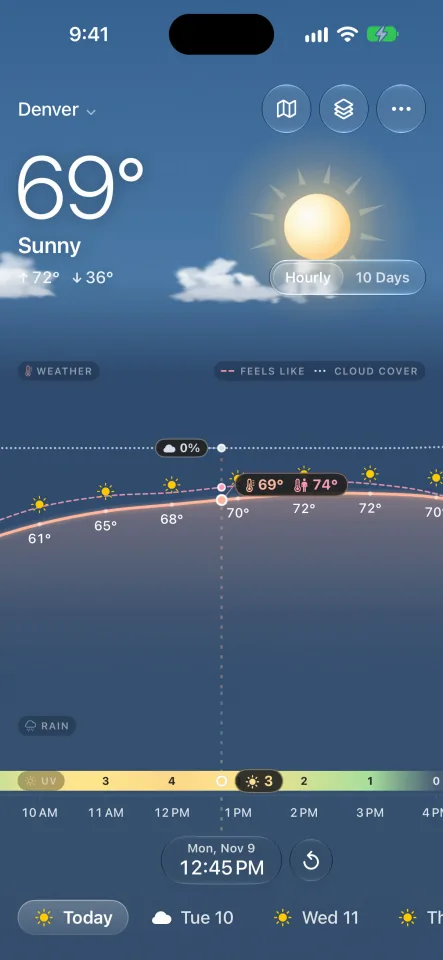
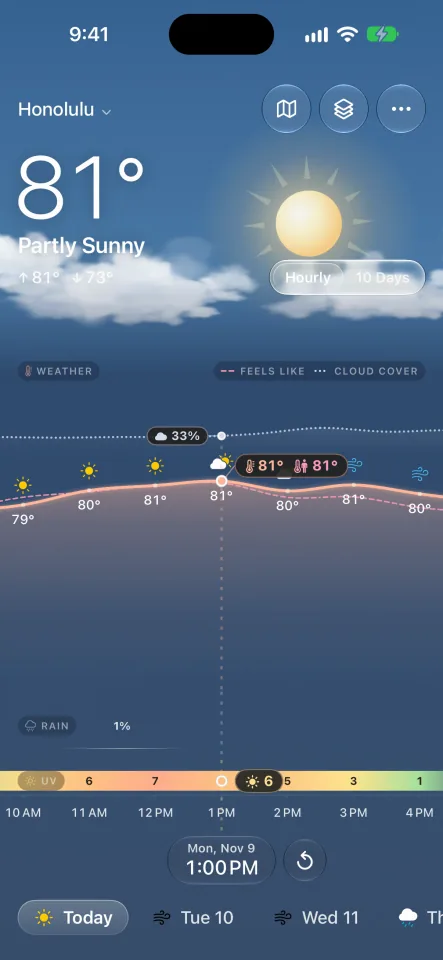
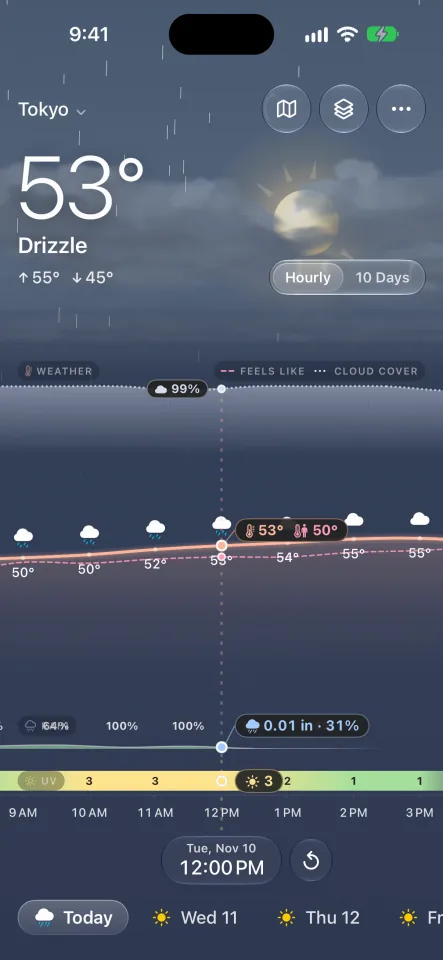
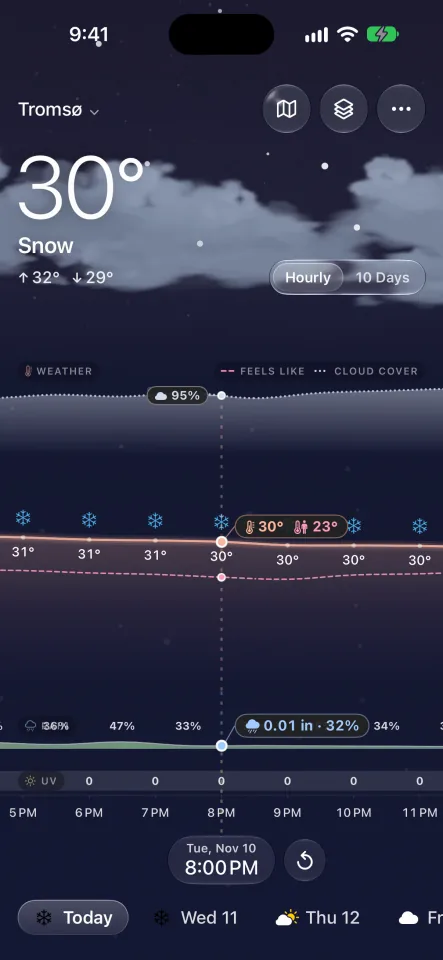
Switch between your places and the conditions show at once: a bright afternoon in Honolulu, drizzle over Tokyo, snow in Tromsø, a storm in Lisbon.

Ten days

Ten days, one swipe.

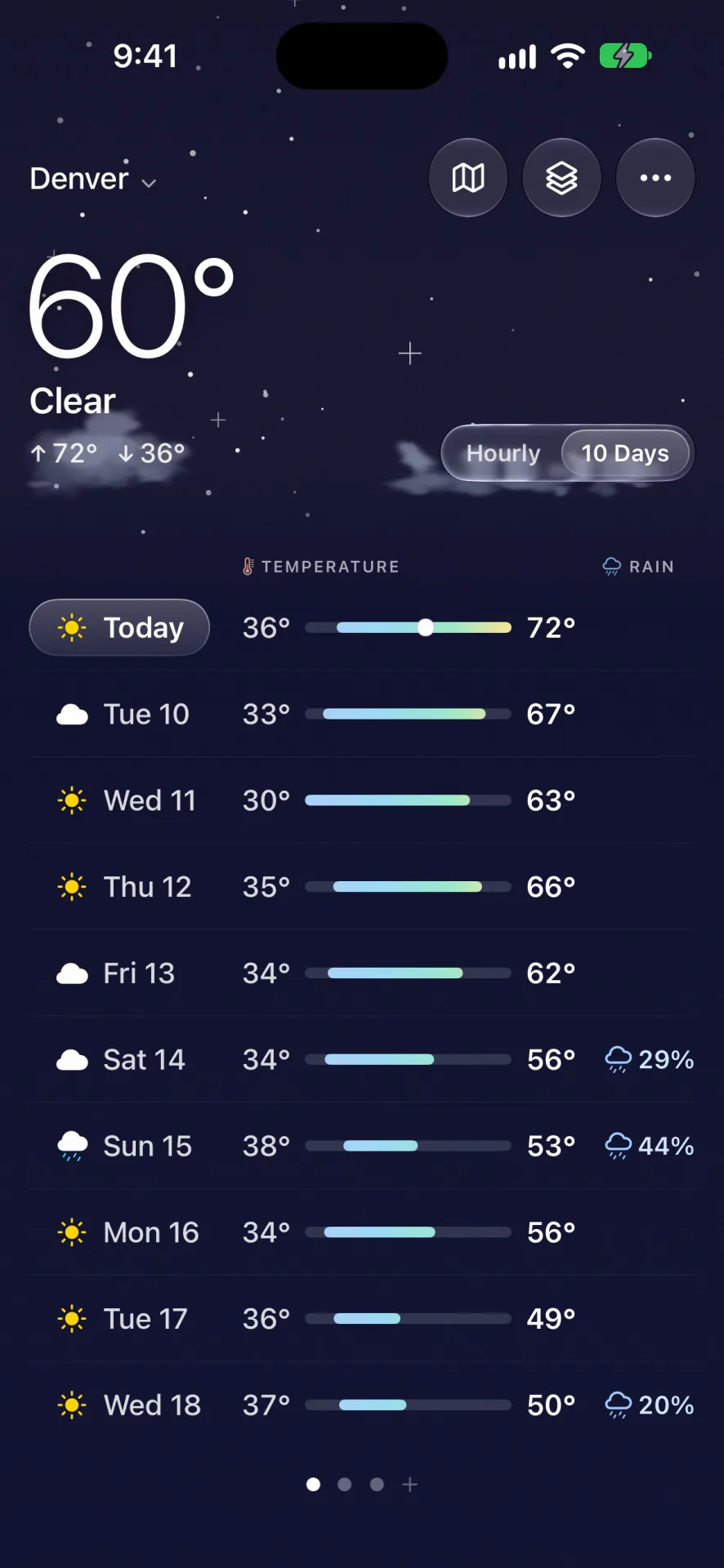
One continuous hourly timeline runs from the start of yesterday to ten days ahead. Swipe anywhere to move through time, and the chart and the readout move with you. Switch to 10 Days for each day's high, low and chance of rain in one list.

The ten-day view in Denver: each day with its symbol, low and high on a temperature bar, and the chance of rain where it's worth saying.
What's next

What changes next, in plain words.

Under the temperature, one line says what the weather does next and when. Rain on its way comes first; while it rains, the line tells you when it stops. It's read off the same hours the chart draws, so the two never disagree, and it's there on Apple Watch and in the widgets too.

Lighthouse Pro

See the storm coming.

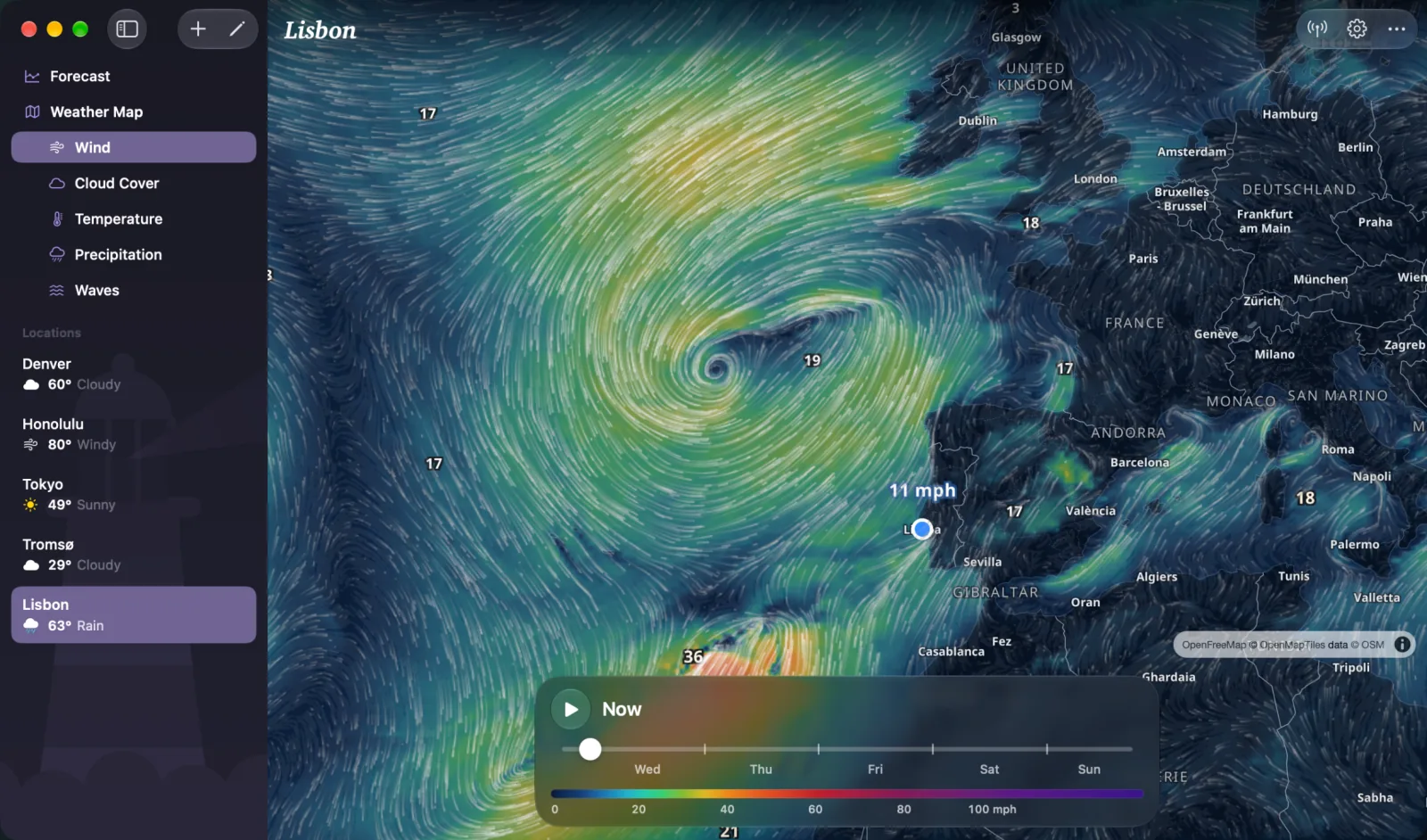
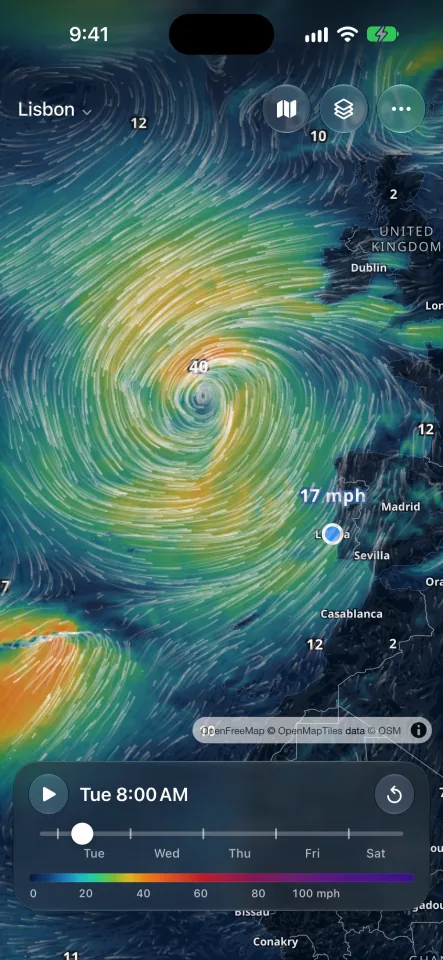
Animated maps of wind, rain, cloud cover, temperature and waves from global weather models, updated four times a day. Press play to watch a front sweep in, about five days ahead, and seven and a half for the waves.

On iPhone and iPad the map takes the forecast's place at a tap; on the Mac it sits in the sidebar with its layers.

Lighthouse on the Mac: the animated wind map of a storm spinning off Portugal and the British Isles, with the map's layers in the sidebar.
The wind map on iPhone: the same storm, wind speeds coloured from green to orange, and the time bar to play it forward.
And the details

Made with care, down to the units.

Your units, your way

Fahrenheit or Celsius; mph, km/h, m/s or knots; the pressure unit you're used to. Data labels on the chart when you want every figure.

Your places, on every device

Add a place on your iPhone and it's waiting on your Mac, iPad and Apple Watch, synced through your own iCloud.

In nine languages

English · العربية · 简体中文 · Français · Deutsch · 日本語 · 한국어 · Русский · Español

iPhone · iPad · Mac · Apple Watch

Wherever you check the weather.

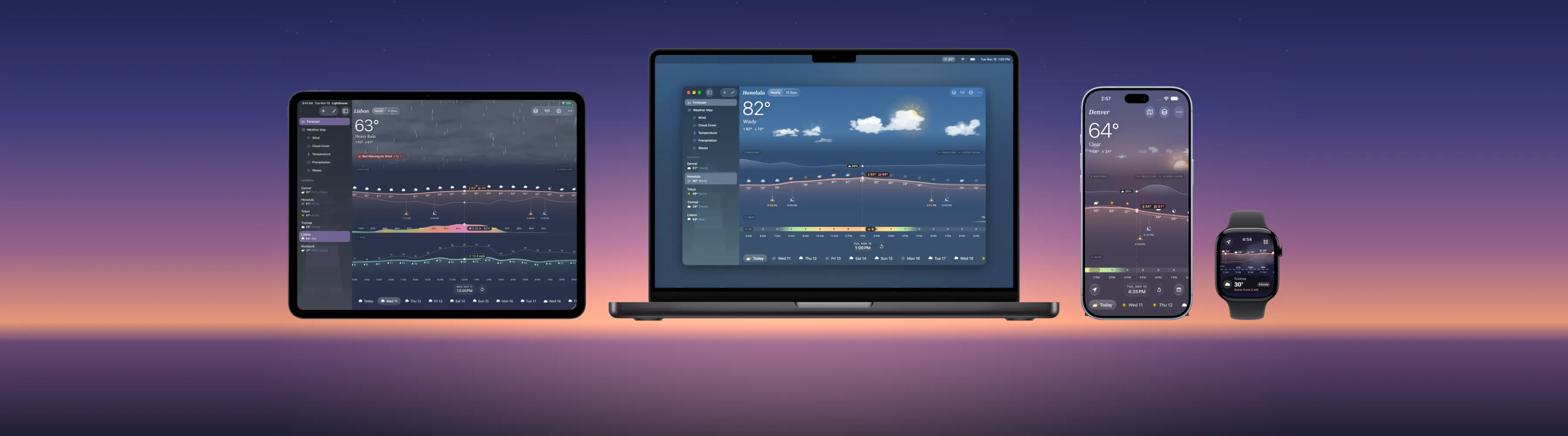
Lighthouse is native on every Apple device you carry, from the menu bar of your Mac to your wrist, with your places in sync.

Lighthouse on iPad, MacBook Pro, iPhone and Apple Watch side by side on a dusk sky: Lisbon's chart on iPad, Honolulu on the Mac, Denver on iPhone and the hourly chart on the watch.

Mac: right in your menu bar

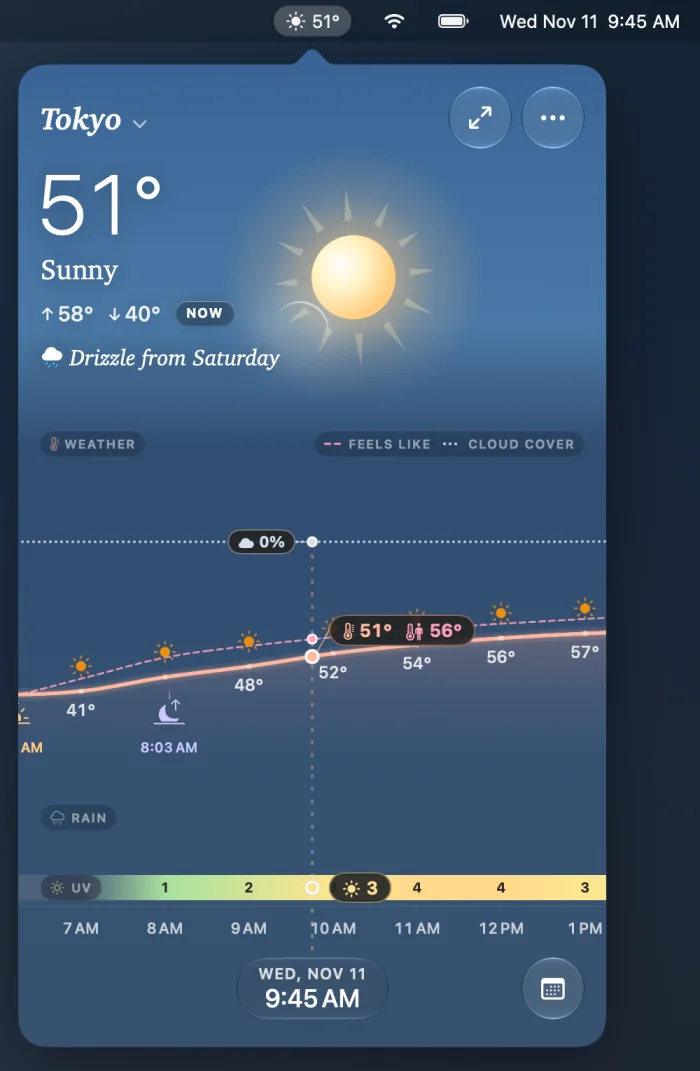
The temperature at a glance, the whole forecast a click away. Open the full window when you want room, with your places and the weather map in a sidebar.

The Lighthouse popover open from the Mac menu bar: Tokyo, 51 degrees and sunny, drizzle from Saturday, and the day's chart.

Apple Watch: the chart on your wrist

A scrolling hourly chart, what's next in a line, the next ten days and your places. Complications come with Lighthouse Pro.

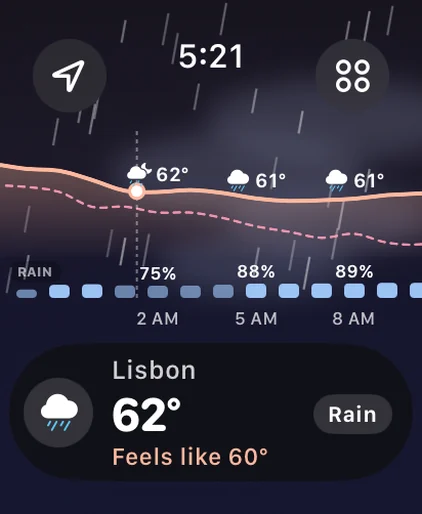
Lighthouse on Apple Watch: Lisbon, 62 degrees and rain, the hourly chart above.
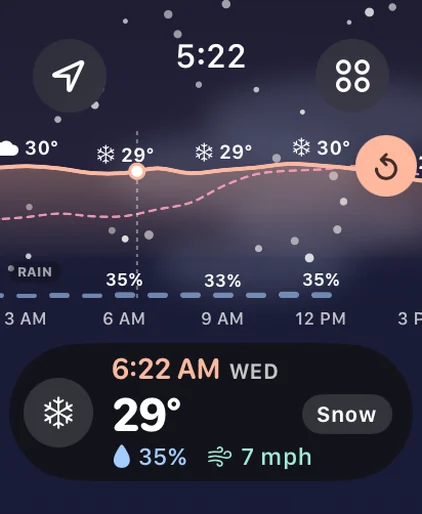
Snow at 6:22 AM, 29 degrees, on Apple Watch.
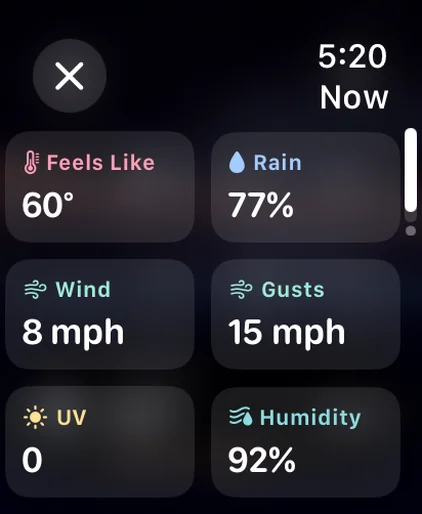
Now on Apple Watch: feels like 60, rain 77 percent, wind 8 mph, gusts 15 mph, UV 0, humidity 92 percent.

iPhone, iPad and iPhone Duo

The full chart in your pocket, swiped through ten days. On iPad and an open iPhone Duo, room for your places in a sidebar beside it, and one forecast across both of Duo's screens.

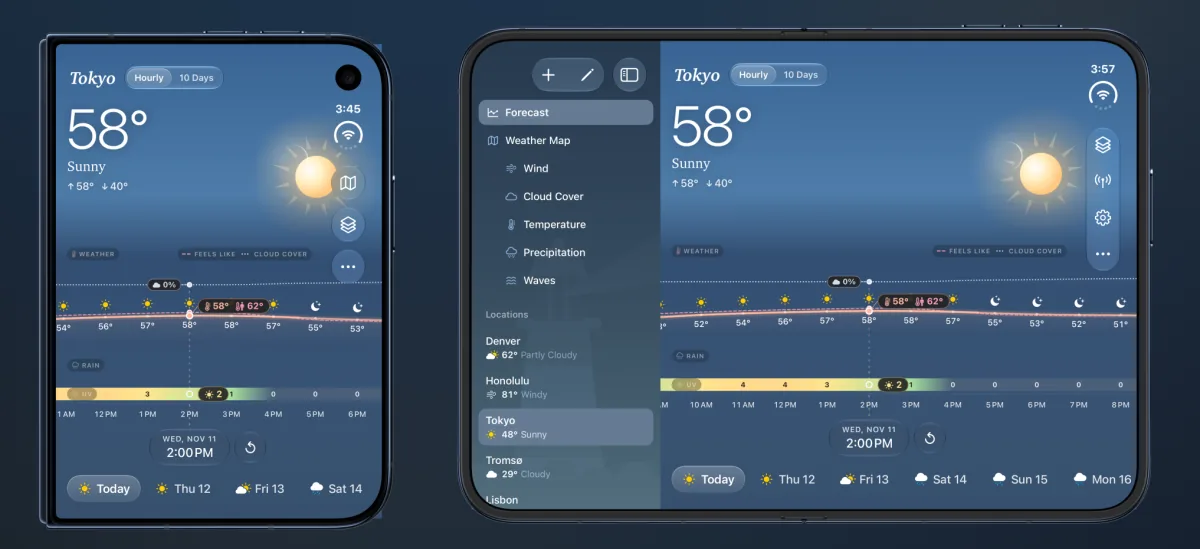
Lighthouse on iPhone Duo, closed and open: Tokyo, 58 degrees and sunny, with the places and the weather map's layers in a sidebar on the open screen.

Widgets

Now and Next, with the weather now, the next sunrise or sunset and what's coming, is free on your Home Screen. Forecast, UV Index and Days come with Pro.

Privacy

Your forecast. Not your data.

Plenty of weather apps pay their way with your location. Lighthouse doesn't: there's nothing to sign up for, nothing following you, and nothing to sell.

Read the privacy policy
  • No account

    No sign-up, no email, no profile. Open the app and read the forecast.

  • No ads, no trackers

    No advertising, no analytics or tracking SDKs, and no advertising identifier.

  • Location for the forecast

    Your location is used only to fetch the forecast where you are, and only while the app is in use.

  • Your places, your iCloud

    Saved places sync through your own iCloud account, never through servers of ours.

Pricing

Free to start. Pro when you want more.

Lighthouse

Free

Everything you need to read the weather

  • The whole chart, all eight layers
  • Ten days, hour by hour
  • Official severe weather alerts
  • The plain-words outlook line
  • Apple Watch app and the Mac menu bar
  • The small Now and Next widget
  • Current Location and one saved place

Lighthouse Pro

$2.99 / month

or $12.99 a year, about $1.08 a month

Everything in Free, and:

  • Weather maps: wind, rain, clouds, temperature, waves
  • Unlimited places
  • A second forecast for any layer, to compare
  • Every widget: Forecast, UV Index, Days and the medium Now and Next
  • Apple Watch complications
  • More frequent background updates

US prices; the App Store shows yours. Lighthouse Pro renews automatically until you cancel in your Apple Account settings.

FAQ

Questions, answered.

What is Lighthouse?

Lighthouse, also called Lighthouse Weather, is a weather app for iPhone, iPad, Mac and Apple Watch made by Rivolu LLC. It shows your whole forecast (temperature, feels like, rain, wind, cloud cover, UV, humidity and pressure) on one hourly chart that runs ten days ahead, under an illustrated sky that follows the real conditions and the time of day.

How is Lighthouse different from other weather apps?

Most weather apps split the forecast into separate cards or screens, each on its own scale. Lighthouse puts every layer on one shared hourly timeline, so you can see how temperature, rain and wind change together. It shows established forecasts as they are, never patches one forecast with another, and keeps official alerts current. It adds a one-line outlook that says what changes next and when (such as "Rain from 4 PM"), an illustrated sky that follows the conditions, and animated weather maps. It has no ads, no account and no tracking.

How accurate is Lighthouse's forecast?

Lighthouse doesn't make a forecast of its own: it shows forecasts from established weather services, built on national and global weather models, exactly as they give them. What Lighthouse adds is care in how they're shown. Each layer comes whole from one forecast, and where a forecast you chose can't cover a place, the default supplies the whole layer rather than filling gaps. Severe weather alerts are the official ones, rechecked as often as every half hour and taken down if they can't be confirmed. The app, its widgets and Apple Watch show the same figures for the same hour, and every time is the place's own local time.

Is Lighthouse free?

Yes. Lighthouse is free to download, and the free version includes the full chart with all eight layers, ten days ahead, severe weather alerts, the Apple Watch app, the Mac menu bar forecast and the small Now and Next widget, for your current location and one saved place.

Lighthouse Pro costs $2.99 a month or $12.99 a year in the US and adds animated weather maps, unlimited places, a second forecast to compare for any layer, every widget, Apple Watch complications and more frequent background updates.

Which devices does Lighthouse run on?

iPhone with iOS 26 or later, iPad with iPadOS 26 or later, Mac with macOS 26 or later, and Apple Watch with watchOS 11 or later. It is made for iPhone Duo too, with one forecast across both screens. Saved places sync between your devices through iCloud.

Does Lighthouse track me or show ads?

No. Lighthouse has no ads, no account, and no analytics or advertising SDKs, and it doesn't use the advertising identifier. Your location is used only to get the forecast where you are. The privacy policy at lighthouseweather.fyi/privacy explains what the app sends and why.

Does Lighthouse have widgets and Apple Watch complications?

Yes. The Now and Next widget, with the weather now, the next sunrise or sunset and what the weather does next, is free in its small size. The Forecast, UV Index and Days widgets, the medium Now and Next widget and Apple Watch complications come with Lighthouse Pro.

Can Lighthouse warn me about severe weather?

Yes. Official weather alerts appear above the chart with the agency that issued them, and you can turn on notifications for severe and extreme alerts at your saved places and your current location.

Which languages is Lighthouse available in?

English, Arabic, Chinese (Simplified), French, German, Japanese, Korean, Russian and Spanish.

Who makes Lighthouse, and when is it available?

Lighthouse is made by Rivolu LLC, the independent developer that also makes WindTrac, the animated wind and wave map. Lighthouse is coming soon to the App Store. Questions and feedback go to feedback@rivolu.com.

The Lighthouse app icon: a red and white lighthouse shining its beam across a starry night sky above the clouds.

Know what's coming.

Lighthouse is coming soon to the App Store for iPhone, iPad, Mac and Apple Watch.

Coming soonto the App Store